> ## Documentation Index
> Fetch the complete documentation index at: https://orderly.network/docs/llms.txt
> Use this file to discover all available pages before exploring further.
# Affiliate & Referral Program (Legacy)
> Explore the legacy documentation for the Orderly referral ecosystem for Builders, Affiliates, and Traders.
## Overview
The referral system is a crucial component of the Orderly ecosystem, designed to incentivize user growth and engagement through a structured rewards program.
A builder can choose to share part of its builder fees to incentivize a distributor, affiliate, or referrer for bringing in new traders.
The ecosystem consists of three key participants:
1. **The Builder (DEX):** The DEX built on Orderly. Builders determine the fee structures and maximum rebate limits.
2. **The Referrer (Affiliate):** A user (e.g., a KOL, influencer, or community leader) who invites others to trade. They can modify the fee split between themselves and the trader, but not the maximum rebate limit.
3. **The Referee (Trader):** The new user who signs up using a referral code.
## How It Works
### 1. The Binding Process
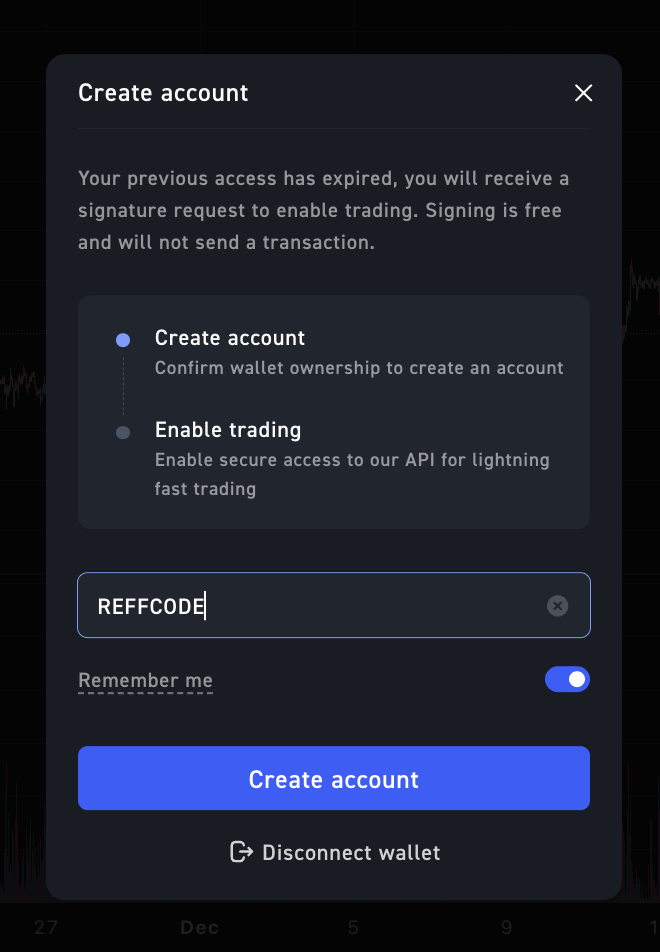
The binding is established when a new user (Referee) connects to a Builder and enters a referral code. Their account is permanently bound to the Referrer. A bound referral code cannot be removed or modified after binding.
 ### 2. The Reward Split
When a Referee executes a trade, the trading fee is split automatically. Orderly Network retains a base protocol fee, and the remaining **Builder Fee** is distributed among the Builder, Referrer, and Referee based on the configured rebate settings.
* **Referrer Rebate:** Commission earned by the affiliate for inviting the user.
* **Referee Rebate:** A discount returned to the trader, incentivizing them to use the referral code.
* **Builder Revenue:** The remaining portion of the fee retained by the platform.
## Example Calculation
The following example demonstrates how fees flow between parties.
**Scenario:**
* **Orderly Base Fee:** Depends on the Builder's current fee tier. This tiering applies only to the Builder's base fee paid to Orderly.
* **Example taker trade:** If Orderly's base taker fee is 3 bps and the Builder charges a 6 bps user-facing taker fee, the Builder's net profit is 3 bps.
* **Example maker trade:** Maker economics depend on the Builder's Orderly base maker fee, which can be 0 bps or negative for higher tiers. The user-facing maker fee is still set by the Builder and can also be negative, which entitles qualifying maker trades to a rebate.
**Referral Configuration:**
The Builder generates a code for a KOL with an **80% Max Rebate**, split **50:50** between the Referrer and Referee.
| Party | Share of Net Profit | Calculation |
| :----------------------- | :------------------ | :---------------------------------------------- |
| **Total Net Profit** | **100%** | **3 bps in this example** |
| **Referee (Trader)** | 40% | Receives 40% of the 3 bps profit as a discount. |
| **Referrer (Affiliate)** | 40% | Receives 40% of the 3 bps profit as commission. |
| **Builder** | 20% | Retains the remaining 20% of the 3 bps profit. |
**In Dollar Terms:**
If a user generates **\$10 USDC** in *Net Builder Fees*:
1. **\$4.00** is returned to the Trader (Referee).
2. **\$4.00** is credited to the Affiliate (Referrer).
3. **\$2.00** is retained by the Builder.
## Configuration for Builders
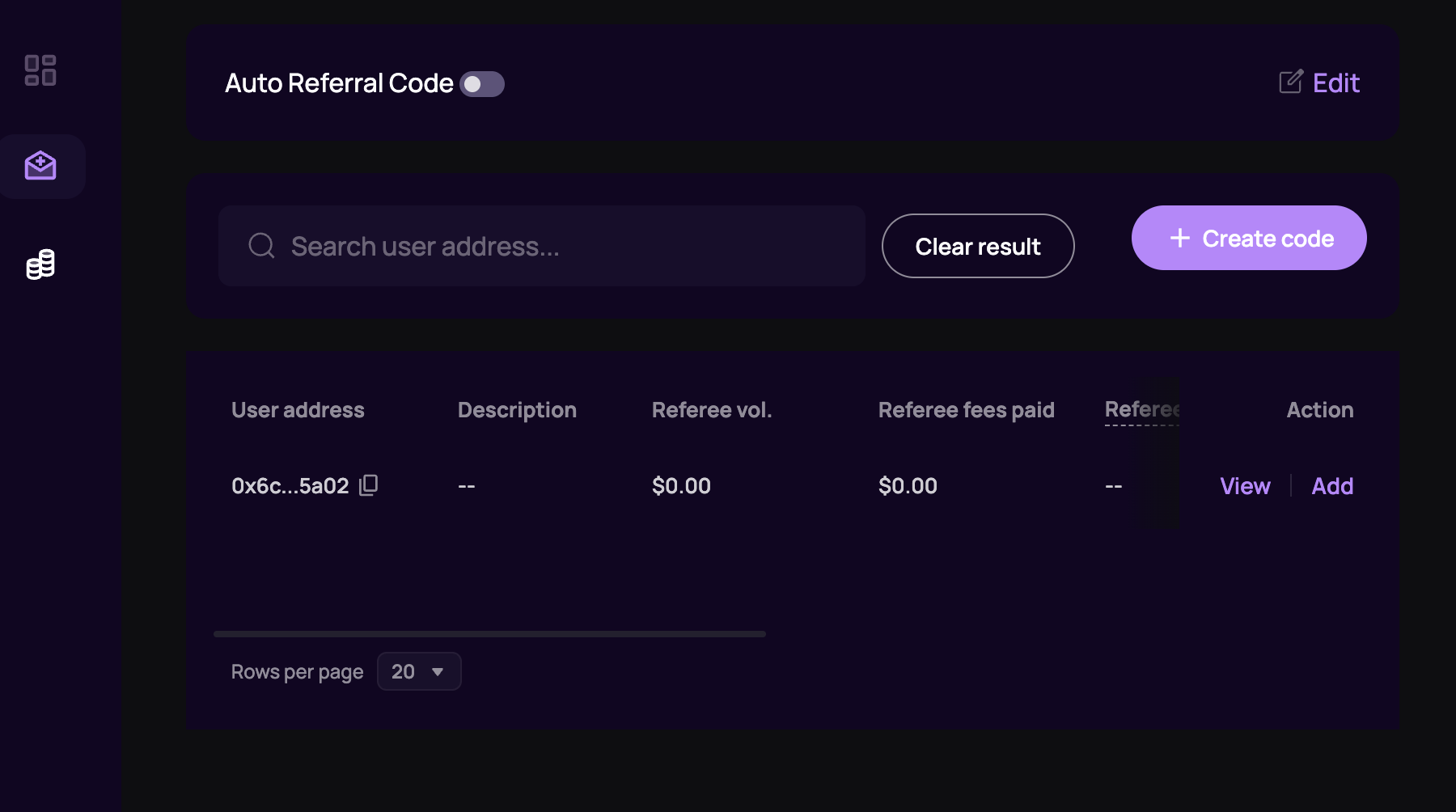
Builders manage referral codes and rebate rates via the Orderly Admin Console.
**Admin console:** [https://admin.orderly.network/referral](https://admin.orderly.network/referral)
Click ""+ create code" button.
### 2. The Reward Split
When a Referee executes a trade, the trading fee is split automatically. Orderly Network retains a base protocol fee, and the remaining **Builder Fee** is distributed among the Builder, Referrer, and Referee based on the configured rebate settings.
* **Referrer Rebate:** Commission earned by the affiliate for inviting the user.
* **Referee Rebate:** A discount returned to the trader, incentivizing them to use the referral code.
* **Builder Revenue:** The remaining portion of the fee retained by the platform.
## Example Calculation
The following example demonstrates how fees flow between parties.
**Scenario:**
* **Orderly Base Fee:** Depends on the Builder's current fee tier. This tiering applies only to the Builder's base fee paid to Orderly.
* **Example taker trade:** If Orderly's base taker fee is 3 bps and the Builder charges a 6 bps user-facing taker fee, the Builder's net profit is 3 bps.
* **Example maker trade:** Maker economics depend on the Builder's Orderly base maker fee, which can be 0 bps or negative for higher tiers. The user-facing maker fee is still set by the Builder and can also be negative, which entitles qualifying maker trades to a rebate.
**Referral Configuration:**
The Builder generates a code for a KOL with an **80% Max Rebate**, split **50:50** between the Referrer and Referee.
| Party | Share of Net Profit | Calculation |
| :----------------------- | :------------------ | :---------------------------------------------- |
| **Total Net Profit** | **100%** | **3 bps in this example** |
| **Referee (Trader)** | 40% | Receives 40% of the 3 bps profit as a discount. |
| **Referrer (Affiliate)** | 40% | Receives 40% of the 3 bps profit as commission. |
| **Builder** | 20% | Retains the remaining 20% of the 3 bps profit. |
**In Dollar Terms:**
If a user generates **\$10 USDC** in *Net Builder Fees*:
1. **\$4.00** is returned to the Trader (Referee).
2. **\$4.00** is credited to the Affiliate (Referrer).
3. **\$2.00** is retained by the Builder.
## Configuration for Builders
Builders manage referral codes and rebate rates via the Orderly Admin Console.
**Admin console:** [https://admin.orderly.network/referral](https://admin.orderly.network/referral)
Click ""+ create code" button.
 ### Setup Fields
A popup window will appear for Builders to create a referral code for an address.
### Setup Fields
A popup window will appear for Builders to create a referral code for an address.
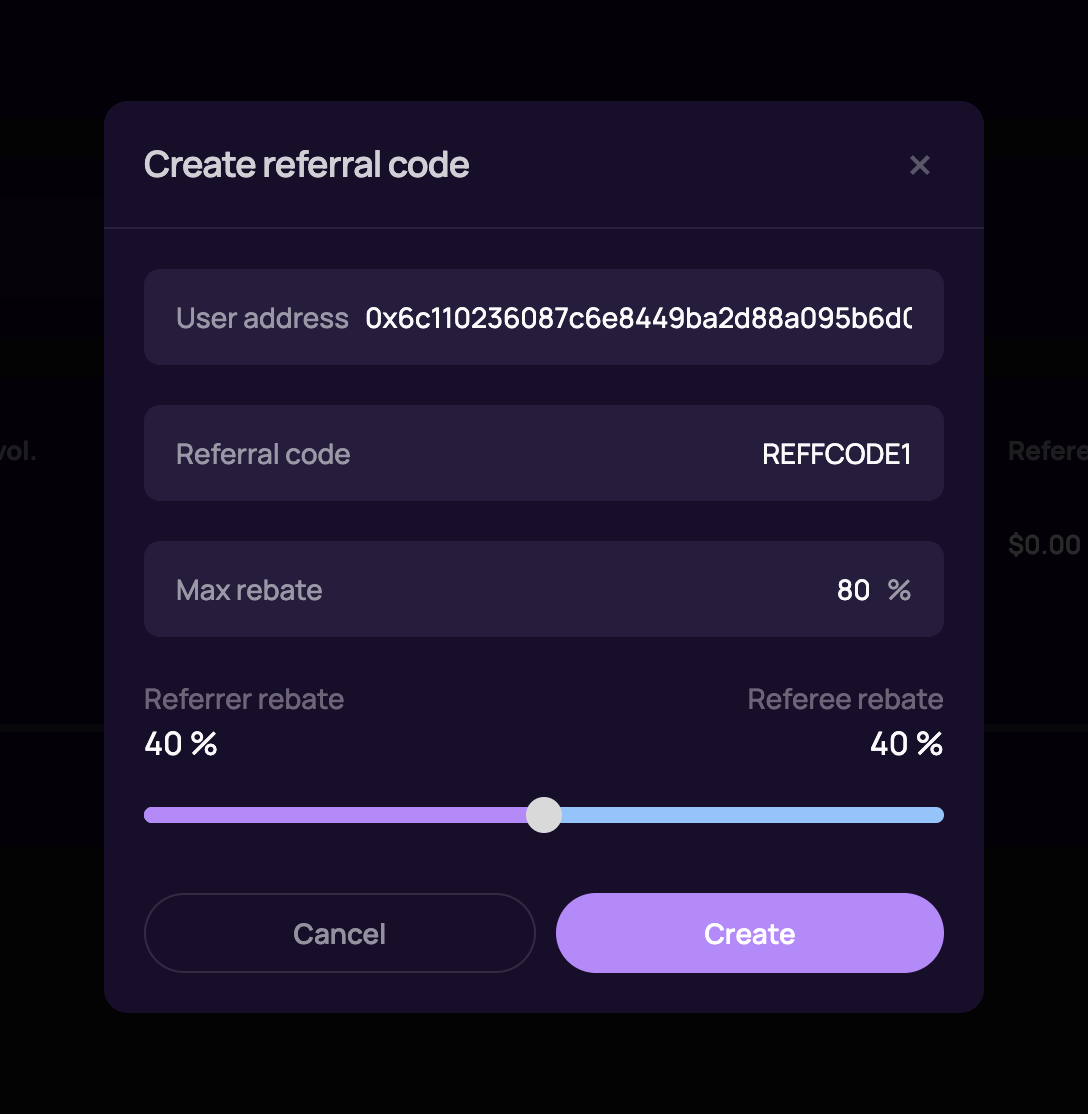 1. **User Address:** The wallet address of the Affiliate (Referrer) who will own this code.
2. **Referral Code:** The unique string traders will enter (e.g., `REFFCODE1`).
3. **Max Rebate:** The total percentage of the Builder's Net Profit allocated for rebates (e.g., 80%).
4. **Split Slider:** Determines how the rebate is divided:
* **Referrer Rebate:** The percentage of the rebate the Affiliate keeps.
* **Referee Rebate:** The percentage of the rebate returned to the Trader.
## Distribution
Rewards are calculated automatically by the Orderly protocol.
* **Frequency:** Rewards are typically distributed **daily**.
* **Currency:** Payouts are settled in **USDC**.
## Auto referral system
1. **User Address:** The wallet address of the Affiliate (Referrer) who will own this code.
2. **Referral Code:** The unique string traders will enter (e.g., `REFFCODE1`).
3. **Max Rebate:** The total percentage of the Builder's Net Profit allocated for rebates (e.g., 80%).
4. **Split Slider:** Determines how the rebate is divided:
* **Referrer Rebate:** The percentage of the rebate the Affiliate keeps.
* **Referee Rebate:** The percentage of the rebate returned to the Trader.
## Distribution
Rewards are calculated automatically by the Orderly protocol.
* **Frequency:** Rewards are typically distributed **daily**.
* **Currency:** Payouts are settled in **USDC**.
## Auto referral system
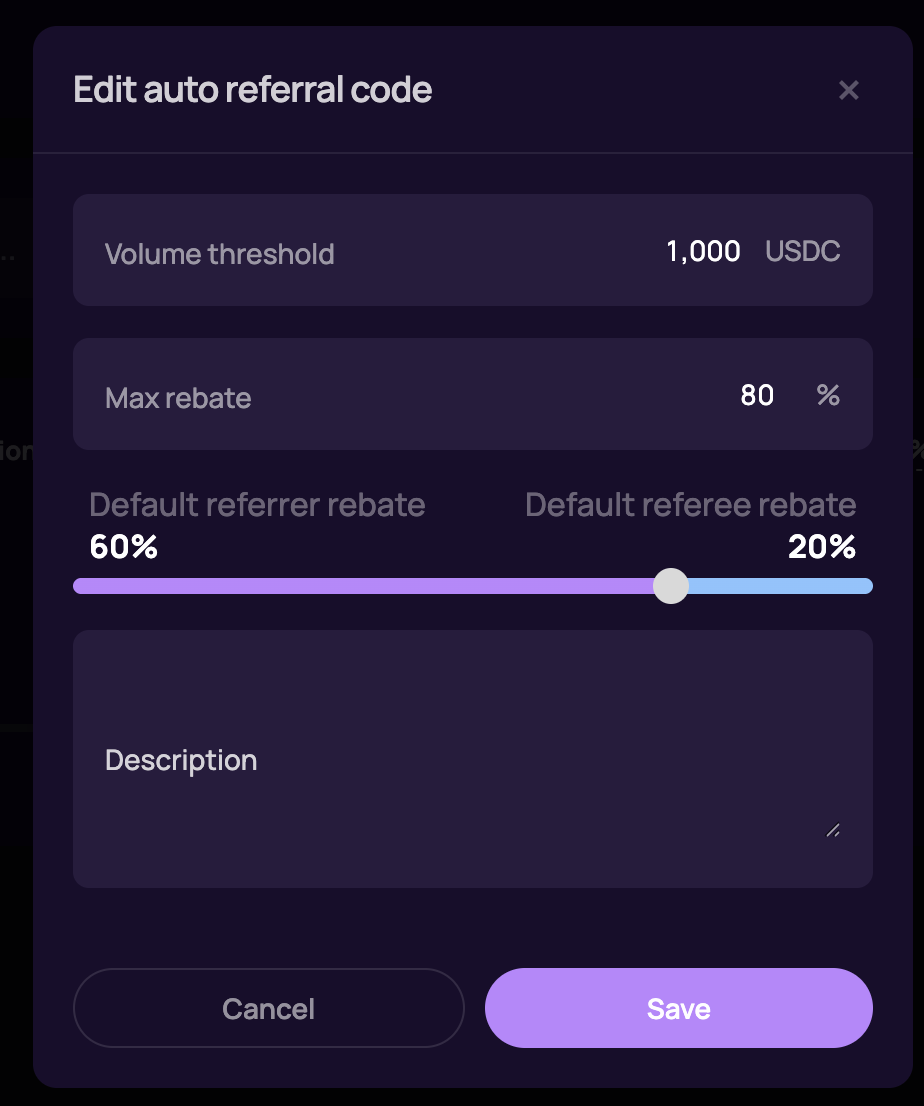 Similar to the affiliate system, the auto-referral system grants traders a referral code once they reach a specific trading volume. This means that instead of manual entry, traders are automatically assigned a code based on their trading activity.